|
CAD for leather goods and small leather goods |  |
 |
 |
|
CAD for leather goods and small leather goods | |
|
|
| Mozart | Liszt | Virtual-Design | Support | Contacts |
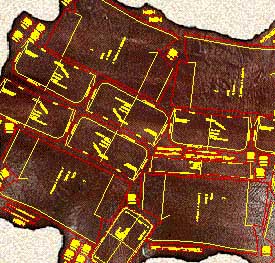
| Mozart is a CAD realized following the requests and
suggestions of leather goods pattern-makers to simplify and expand their work being
them free to design according to their ideas. Mozart requires AutoCAD® or ZWCAD®. The license of Mozart does not include the license of AutoCAD® or ZWCAD® Mozart 8 is available for AutoCAD® up to version 2026 and for ZWCAD® up to version 2025. |
|
Quick learning Built on pattern-makers' requirements Mozart shares his working method giving full liberty to design the model. The pattern-maker can concentrate himself on the model to be realized. He does not have to code the materials or pieces before or during the drawing. Freely customizable The user can easily change many settings of Mozart: colors, the method of calculating the bill of materials and the bill of working times and many other parameters. Mozart can also load and use custom toolbars, scripts and commands written by the user. |
|
|
Flexibility The user is free to choose the names of the patterns and their hierarchy. Each pattern is a single file and Brands, Lines, Seasons etc. can be organized by folders. Each pattern is independent from the others and can be copied or moved in whole or in part from one folder to another like any other file. The bill of materials and the bill of working times can be performed in different ways and the reports are produced as ASCII text or Excel document. |
|
Data exchange The patterns can be read using many others CAD programs. The cutting can be done using a wide range of machines from vertical or flatbed plotters to knife, laser or water-jet cutting machines. The bill of materials, the bill of accessories and the bill of working times can be exported to others data management systems. Development The open structure of Mozart means it can be constantly improved according to users suggestions and requests. The upgrade of Mozart does not oblige the user to upgrade the other components of the CAD system. Plug-ins increase the power and the flexibility of Mozart. |
|
| Plug-ins add specific functions to Mozart. The user himself can write his own plug-ins, Mozart will automatically load them. Plug-ins allow to customize Mozart's installations to the needs of the user and reduce the cost because they avoid the purchase of what is not needed. Users can request the development of personal plug-ins to create special reports or drawing functions. On request personal plug-ins are not available to other users in order to protect their confidentiality. |
. Unlike older consoles (NES, Genesis), modern arcade games are essentially specialized PCs running Windows or Linux. However, they are protected by: Hardware Dongles: Physical USB keys required to boot. Network Checks:
I learned the hard way: a “ROMs archive� isn’t plug-and-play because:
Whether you are targeting a like LaunchBox or RetroBat? Share public link
: For standard gamepads (Xbox, PlayStation), XInput is generally recommended.
Before downloading a multi-gigabyte archive, do the following: teknoparrot roms archive work
| Archive type | Tool | Action | |--------------|------|--------| | .7z / .rar / .zip | 7-Zip | Extract to a folder – do not run from inside archive | | .part01.rar (split) | 7-Zip | Open first .part01.rar , extract all | | .exe (self-extracting) | Run it | Extract to a dedicated folder (e.g., C:\TP_Games\GameName ) |
: Get the latest version from the Official Teknoparrot Website.
Finding a complete TeknoParrot ROMs archive that actually works can feel like chasing a moving target. TeknoParrot is a powerful emulator. It lets you play modern arcade games on a standard Windows PC. However, setting up these games requires specific files, updates, and configurations.
Many users complain that TeknoParrot ROMs archives fail to run. Common reasons: Network Checks: I learned the hard way: a
: The specific hardware requirements for running high-end arcade dumps.
Can you make a "TeknoParrot ROMs archive work" legally? This is nuanced.
TeknoParrot is not a traditional emulator in the sense of MAME. It acts as a compatibility layer and a loader. It bypasses the complex hardware checks and dongle requirements, allowing the original game software (the executable files) to run on a modern Windows PC.
If a game from your archive crashes instantly, the executable might still be encrypted or require a specific patch. Check your archive source for a fixes folder or an accompanying .dll injection file designed to bypass the original arcade cabinet's hardware security checks (dongle protection). Troubleshooting Common Issues Finding a complete TeknoParrot ROMs archive that actually
TeknoParrot supports over 400 arcade titles across many modern arcade systems. The community has compiled full game lists [citation needed], but the most popular genres are:
Unlike traditional emulators that mimic console hardware (like a Super Nintendo or PlayStation), TeknoParrot acts more like a translator. Because most modern arcade machines (from Sega, Namco, and Taito) run on PC-based hardware using Windows Embedded or Linux, the "ROMs" are actually the original game files. TeknoParrot intercepts the game’s calls to specific arcade hardware—such as specialized JVS (Japan Video System) I/O boards, coin hoppers, and card readers—and redirects them to your PC’s keyboard, mouse, or controller. The Role of the Archive Work
Safe downloads, torrent options available, and long-term hosting.
These are not technically "ROMs" in the traditional sense, but full dumps of the hard drives used in arcade PCs.
Are you encountering a specific with a particular title?
All product names, brand names or trademarks named here belong to their respective holders. |