Hippo is a personal CRM built for Apple platforms. Keep notes, events, and to-dos for the friends, family, and colleagues you care about — all stored on your device. No account. No cloud server. No Contacts permission required.
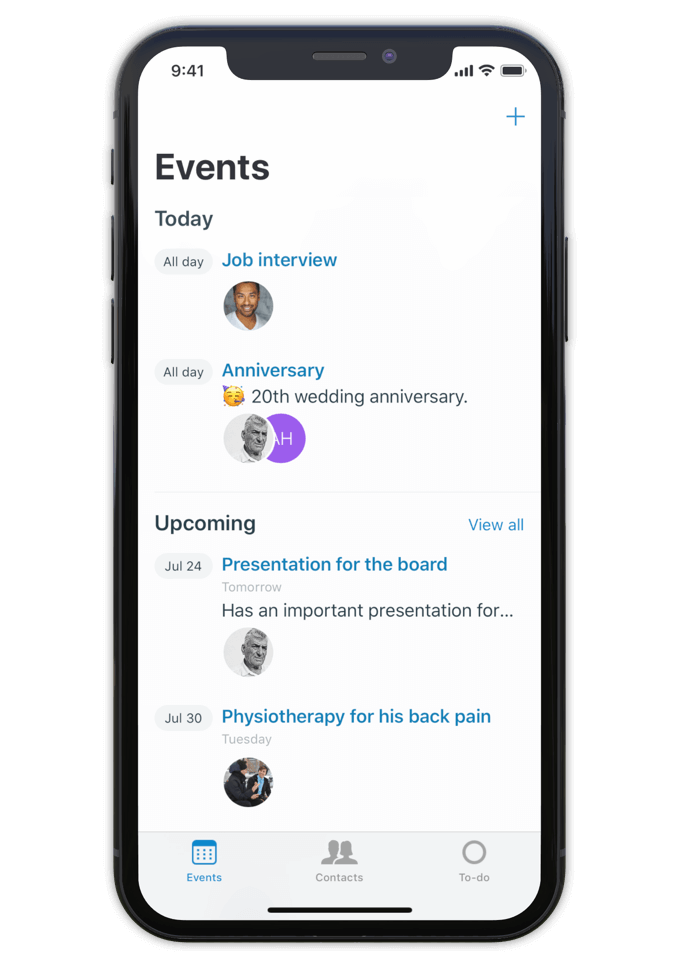
Hippo is a personal CRM for iPhone, iPad, and Mac. A personal CRM helps you keep track of the people in your life the way a sales CRM helps a salesperson track leads — but focused on the relationships that actually matter to you. Friends, family, mentors, colleagues, the people you want to stay close to.
Unlike most personal CRMs, Hippo stores everything on your device. There’s no account to sign up for, no server holding your contacts, and access to your iOS Contacts list is never required (it’s optional, and granted contacts still stay on-device). Optional sync runs through your own private iCloud Drive — never through Hippo.
Hippo is built for people who want to be more attentive without trading their privacy for the privilege.
Make notes, keep track of events and store to-dos for all your contacts.
So next time you meet, a quick glance at the person's profile in Hippo is all you need to remember the details.
Being attentive doesn’t have to be a challenge anymore.
Hippo is your personal reminder.

Use notes to quickly jot down things you learned about your contacts. Like names of kids, new jobs, a promotion, holiday plans, or gift ideas.
Create events for face to face meetings or important life events.
Get reminded when the event is happening so you can ask about it.
Remember the questions you want to ask the next time you meet.
Hippo is the personal CRM that doesn’t want your data.

Monica is a powerful open-source personal CRM, but it’s web-based and requires either a paid hosted plan or self-hosting your own server. Monica’s recent v5 update has shifted the product toward life journaling and modular vaults. If you want a focused personal CRM that runs natively on iPhone, iPad, and Mac with no setup, Hippo is the closer fit.
Dex is a strong choice if your relationships are heavily LinkedIn-driven and you want cross-platform sync via a Dex account. Hippo runs natively on Apple platforms (iPhone, iPad, and Mac) and is built around on-device privacy — your contact data never leaves your device unless you choose to sync via iCloud.
Clay enriches your contacts with public data from across the web. Hippo intentionally doesn’t do this. If you want enrichment, Clay is the right tool. If you want your data to stay local and untouched, Hippo is.
Hippo offers a one-time lifetime purchase option (uncommon in the category) and is the only one that works without ever requesting your iOS Contacts list.

Hi 👋, I’m Roel
I have been struggling with my memory all the time, at work and at home. I used to forget children’s names, someone's job, birthdays, anniversaries and other important life events. At work I couldn’t remember when or how a decision was made.
This made me insecure and unhappy. That is why I built Hippo.
With the Hippo app, I can remember all the important things about the persons I care for. A quick note usually does the job. It is simple and effective … and has changed my life! Hippo has helped me to become a better friend, partner and colleague.
Hippo is free to try for 1 month. After the trial, it’s $14.99 per year or $29.99 as a one-time lifetime purchase.
To view the pricing in your currency, see Hippo in the App Store.

Free to try for one month.
user wants a long article for the keyword "Driver Camara Web Hp Oem Wb918la Abm 1 23". This seems to be a specific webcam driver for an HP OEM product. I need to provide a comprehensive guide. The plan involves multiple search operations to gather information: identifying the device and model, finding drivers, covering installation, troubleshooting, and general webcam driver info. I'll follow the plan step by step. search results show some potential leads. Result 0 might be a driver download page. Result 1 is a Chinese site. Result 2 might be a review. Result 3 might be a driver download. Result 4 might be a driver download. Result 6 might be a driver download. I should open these to gather more information. information gathered provides details about the webcam model and potential driver sources. However, the search results also show some potentially outdated or third-party driver sites. I should also search for more general troubleshooting guides and specific driver versions like "1.23". search results provide some useful information, but there are no official HP pages specifically for "WB918LA". The user's keyword seems to be a very specific OEM part number. The article should focus on how to find and install drivers for this specific webcam, covering identification, driver sources (HP Universal Camera Driver), installation methods, and troubleshooting. I'll structure the article with an introduction, sections on identification, downloading from HP, manual installation, using generic drivers, troubleshooting, FAQs, and a conclusion. I'll cite the relevant sources. the model number WB918LA#ABM is not a standard HP laptop family, it most often refers to an from HP or a specific camera module integrated into an HP monitor or HP All-in-One desktop. Locating a unique "driver" labeled exactly as "Driver Camara Web Hp Oem Wb918la Abm 1 23" can be challenging. As a result, the most effective way to get the device working is to use HP’s universal software or generic Windows drivers.
If your integrated camera is showing a black screen, failing to load in apps like Zoom, or missing entirely from the Windows Device Manager, outdated or corrupted driver files are usually to blame. What is the HP WB918LA#ABM Camera Driver?
This article provides a direct overview of how to safely acquire, manually install, and troubleshoot the on legacy and modern Windows operating systems. Technical Specifications: HP OEM WB918LA ABM Driver Camara Web Hp Oem Wb918la Abm 1 23
: Ensure the "Integrated Camera" is set to Enabled in the BIOS (usually accessed by pressing F10 during startup). 4. Legacy Software Alternatives
on the keyboard to open a window displaying the specific model name and serial number. HP Support Assistant user wants a long article for the keyword
: If it’s still not working, right-click the device again, select Update driver , and choose Search automatically for drivers . 3. Check Privacy Settings
To resolve webcam issues on your HP device, downloading the correct is essential for restoring video functionality. The specific string WB918LA#ABM serves as an official HP product number typically tied to specific laptop families, such as the HP G62 series, widely distributed across Latin America. The plan involves multiple search operations to gather
Ve al portal oficial de Descargas de Software y Controladores de HP.
© 2026 Digital Lunar Point. All rights reserved.